
Know your community
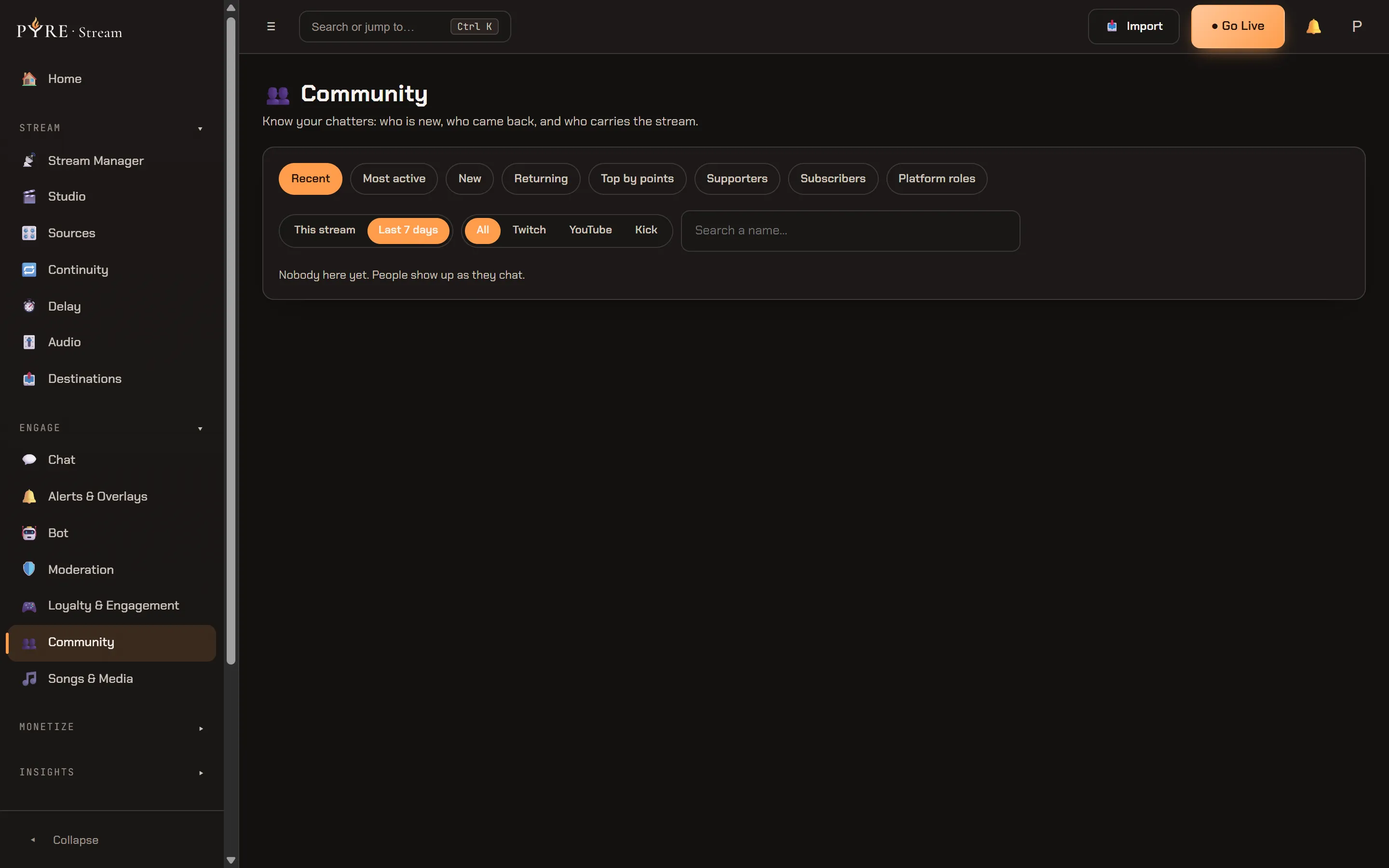
Community is the page that answers “who is that”. It sits under Engage in the Pyre.Stream sidebar, just below Loyalty & Engagement, and it describes itself in one line:
Know your chatters: who is new, who came back, and who carries the stream.
Everything on it is already being collected. The bot has been counting messages since it joined your chat and Loyalty has been counting watch time and points, so the page has something to show on the day you first open it. What it adds is a ranking, a search and a place to write down what you know about somebody.
Two things are true of the whole page, and they are worth reading before the rest.
It is Pyre.Stream only, and that is a decision rather than a gap. There is no
Community pane in the Pyre.Bot portal, and a moderator who has a grant on your
channel does not get a hidden one either: the portal has no page to mount and the
delegated API has no community domain, so a mod asking for it gets a 404. A
viewer dossier holds your private notes about other people, a ranking by money and
a moderation history, which is more sensitive than anything Pyre currently
delegates. Operators acting on your behalf do not get it for the same reason.
It reads the loyalty economy, it never configures it. Points, raffles, store redemptions and minigames all show up in a viewer’s drawer, and every one of those panels is read only with a link to the page that owns the setting. Nothing here sets a rate, a price or a stock level. That all lives in Loyalty and giveaways.
The eight segments
Section titled “The eight segments”The chips across the top are eight rankings of the same people. They are in a fixed order, chatters first:
| Segment | Who it lists, and in what order |
|---|---|
| Recent | Everyone, most recently seen first. The default, and the only segment with no window applied to it. |
| Most active | Seen inside the window, ordered by total messages. |
| New | First seen inside the window, newest first. |
| Returning | People who came back after at least 14 days away, where the return itself falls inside the window. |
| Top by points | Ranked by points earned over their lifetime, not by what they are holding now. |
| Supporters | Ranked by real money first, then by number of support events. |
| Subscribers | Twitch subscribers, longest tenure first. It has its own columns (see below). |
| Platform roles | Anyone carrying a role, from chat badges on every platform plus Twitch’s own VIP and moderator lists. |
Top by points is a different question from !leaderboard. The chat command and
the Top balances table in Pyre.Bot both report the balance somebody is holding
right now. This segment sums everything they have ever earned, so a viewer who
spends their points in your store keeps their place here and loses it there.
Neither number is wrong, they are answers to different questions.
Supporters is deliberately not one score. Bits are not money and months are not money, so the ranking sorts on actual currency first and falls back to how many times somebody supported you. There is no combined points-per-cheer figure, because there is no honest exchange rate to build one from.
The window, the filter and the search
Section titled “The window, the filter and the search”Above the table sit three controls, and they apply to every segment except Subscribers.
This stream/Last 7 days. The window each segment measures over. If you are not live, “this stream” has no session to measure, so the page falls back to the last 24 hours and says so on the table:You are not live right now, so this covers the last 24 hours.- The platform filter, with
All,Twitch,YouTubeandKick.Allis not a platform, it is the absence of a filter. Search a name…, which matches on the start of a display name or on an exact platform id. It searches as you type, after a short pause.
Filtering Platform roles or Subscribers to Kick or YouTube gets you a sentence rather than an empty table, because those platforms do not hand role or membership lists to apps at all.
Reading the roster
Section titled “Reading the roster”The columns are Viewer, Roles, Messages, Watch time, Points and Last seen, with an Open button on each row. Under the table is the line that says where each number came from:
Role chips are read from chat badges, updated as they chat. Watch time and points come from Loyalty; messages and last seen from the bot.
That is the sentence to remember when a chip looks stale. A MOD, VIP or SUB chip is what Pyre last saw on a badge in your chat, so somebody promoted five minutes ago and silent since then still shows their old chips. It catches up the next time they type. On Twitch the Platform roles segment also folds in the authoritative VIP and moderator lists, which is why somebody can appear there without a chip beside their name.
Rows also carry your own marks: a ★ if you starred them, and a chip for every tag you gave them.
Viewers who opted out
Section titled “Viewers who opted out”A viewer can ask Pyre to stop keeping data about them. Their row stays, with their
name, and every number is blank rather than zero: a zero would be a claim, and Pyre
does not have one to make. The row is chipped Opted out, it has no Open
button, and one sentence under the table explains the blanks:
This viewer asked Pyre not to keep data about them, so there is nothing to show here. Their choice applies everywhere, including this page.
The Subscribers table
Section titled “The Subscribers table”Subscribers swaps in its own columns: Subscriber, Tier, Subscribed for, Gift and Points. Tier and gift status come live from Twitch. Tenure does not, and the table says so above itself rather than hiding it in a tooltip:
Tier and gift status come live from Twitch. How long someone has subscribed is only revealed when they resub, so that column fills in over time; until then it reads “not known yet”. YouTube memberships and Kick subscriptions are not shared with apps yet.
So a column full of not known yet on the day you first open the page is the
expected state, not a broken read. It fills in one resub at a time.
The viewer drawer
Section titled “The viewer drawer”Open on any row slides out everything Pyre knows about that person, in seven sections.
At a glance is the summary: First seen (a date and how long ago),
Messages, Watch time, Points, Roles, Support and
Moderation. Under it sits the line for the request you cannot action yourself:
Need someone's data removed? Contact support and it is erased across the whole platform.
A creator-run erase button is deliberately absent, because the erase reaches rows
in other creators’ channels too.
Support lists tips, cheers, subs and gifts as they happened, with a sentence that is always on screen:
Support is counted from the day this page shipped; earlier tips and cheers are not included.
Bits render as bits and months as months. Only a real money event renders a currency, and it renders the currency the event actually carried.
Loyalty holds the read only panels: Points history, Song requests,
Raffles, Store redemptions and Minigames. Each one ends in a link,
Manage in Loyalty › or Manage in Songs & Media ›, pointing at the page that
owns the setting behind it. Nothing in this drawer edits a price, a raffle or a
store item.
Moderation is that viewer’s timeout, ban and deletion history in your channel.
Bot data is what the bot itself remembers: their First message, their Last message, whether they are marked Away, and any Aliases.
Linked identities and Notes each get a section below.
Linked identities are a view, not a merge
Section titled “Linked identities are a view, not a merge”If you know that a Twitch name and a YouTube name are the same person, you can say
so. Search for the other identity, pick it, and confirm. A tip name works too:
somebody who tipped you without an account will never appear in a chat roster, so
the text you typed is offered as a tip name candidate of its own.
The confirmation spells out exactly how far the link goes:
Pyre will show them together as one person. Their points, history and balances stay separate on each platform; nothing merges and you can unlink at any time.
That is the whole safety property. A link changes what you see, never what anybody has. No balance, ledger, raffle or points path knows the link exists, which is what makes a wrong link harmless. It also means the drawer never shows a combined total on its own: the per-identity rows come first and the total sits under the rows that make it up.
Pyre will not guess at links for you. Usernames are not unique across platforms and they can be re-registered, so an automatic merge would eventually pool two strangers’ balances. Every link is one you asserted. Unlink needs no confirmation, because undoing a reversible action should not be gated.
Notes, tags and the star
Section titled “Notes, tags and the star”The Notes card is the first place in Pyre that stores your opinion about a viewer.
-
Write the note. Up to 2000 characters, with a live count under the box.
-
Add tags. Up to 12 per viewer, 32 characters each. Tags show on the roster row, so they are the half of this card you will actually see at a glance.
-
Star them with the ★ VIP checkbox if you want them marked.
-
Select Save. Nothing here saves on blur. A note is something you wrote, and an accidental autosave of a half finished thought about a person is worse than a click. A tag still sitting in the input is added by Save rather than thrown away.
The card’s own footnote draws the line that matters:
Tags show on the roster row. VIP here is your own mark; it does not change anything on Twitch or Kick.
Twitch VIP and moderator
Section titled “Twitch VIP and moderator”Below the Notes card is a separate card titled Twitch roles, chipped
applies on Twitch. It carries two switches, VIP on Twitch and Moderator on
Twitch, and they are the only controls on this page that change anything outside
Pyre.
They are a deliberately separate card from the star above them. The star is your private mark and the switches are real platform roles, so they never share a control.
-
Flip a switch. Nothing is written yet: the checkbox snaps back to where it was and a confirm card opens under it, so nothing on screen claims a change that has not happened.
-
Read the confirm. It always names the person and the platform, in the shape
Remove {name} as a moderator on Twitch?with their name filled in, and then says what that means:This changes their role on Twitch itself, the same as doing it in your Twitch dashboard. It takes effect immediately. -
Note the audit line, which is on the card before you click rather than discovered afterwards:
Every change is written to your audit log.Both outcomes are written, the successful ones and the refused ones alike, so “who un-modded me?” stays answerable. -
Select the verb, which is
Make VIP,Remove VIP,Make moderatororRemove moderator. The switch then repaints from Twitch’s answer, never optimistically from your click.
The card’s footnote is the scope: Kick and YouTube do not let apps change roles, so these switches exist for Twitch only. On a Kick or YouTube viewer the card
renders that sentence instead of two dead switches.
The refusal you are most likely to meet is the VIP and moderator conflict.
Twitch does not allow one person to hold both, so promoting a VIP to moderator
answers Remove their VIP status first. Twitch will not let someone be both. Do
that, then promote them.
Two more states are worth recognising, because neither one is “they do not have the role”:
- Pyre could not read the lists. If your Twitch connection has gone stale the card shows a Reconnect Twitch button rather than switches, since a switch whose state cannot be read is a lie with a control attached.
- Nothing changed. Asking for a state Twitch already agrees with answers
Twitch already has them that way, so nothing changed.and leaves the switch where you put it.
Where the rest of it lives
Section titled “Where the rest of it lives”| You want to | Go to |
|---|---|
| Change points rates, the currency name, store items or raffles | Loyalty and giveaways |
| Change song request rules or prices | Set up music and song requests |
| Time out, ban or set filters | Moderation |
| Give somebody a grant on your channel | Give a moderator access |