
Loyalty and giveaways
Loyalty is your channel’s own currency. Viewers earn it for being in your chat, and they spend it on your store, your minigames and your giveaways. You name it, you decide what it is worth, and it is virtual the whole way down: loyalty points are never money and never convert to money.
It is already running. A channel that has never opened this page earns 1 point
per minute and already answers !points, so the first decision is not whether
to turn it on. It is what the numbers should be.
Before you start
Section titled “Before you start”The bot has to be in your chat, because everything here is measured from chat. See Getting started.
Loyalty & Giveaways lives under Engage in the sidebar and is yours alone. It is one of the sections that simply does not appear on a channel you moderate, so a moderator cannot see your balances, change your rates or draw your raffles from the portal. What they can do, they do from chat, and that list is below. See Give a moderator access.
What chat types
Section titled “What chat types”These are built in reads. They work with no setup, they are open to everyone, and they are the same on every platform the bot reads.
| Command | What it does |
|---|---|
!points | The viewer’s own balance |
!points <name> | Somebody else’s balance |
!watchtime | How long the bot has counted them for, in words |
!leaderboard | The top 3 balances. !leaderboard 10 for more, up to 20 |
!top | The same as !leaderboard |
!items | Your store’s list. !store does the same |
!redeem <item> | Spend on a store item, matched by name |
!gamble <amount> | Stake points. !gamble all stakes the balance |
!slots <amount> | The other minigame |
!duel <name> <amount> | Challenge somebody. Points move only if they accept |
!accept | Take a pending duel. !duel accept does the same |
Two more spend points and live with the fun commands rather than here:
| Command | What it does |
|---|---|
!gift <name> <amount> | Hand some of your own balance to somebody else |
!coinflip <stake> | Stake points on a flip |
!gift only works on somebody the bot has already seen in your chat, and it
refuses anyone who has opted out of being tracked. Both verbs need the fun
commands switched on for your channel.
Moderators get four more, and they are the only loyalty writes anyone can make from chat:
| Command | What it does |
|---|---|
!raffle start <keyword> | Open a raffle chat enters by typing the keyword |
!raffle draw | Draw the open raffle |
!raffle reroll | Draw again, excluding whoever already won |
!openstore, !closestore | Open and close redemptions |
!raffle start takes three optional switches: -cost=50 for an entry price,
-winners=3 to draw more than one, and -floor=subscriber to set the lowest
level that may enter.
There is no !addpoints and no !setpoints. Nobody, moderator or not, can mint
or take points from chat. Adjusting a balance by hand is not a thing the bot
does today.
The minigames come with fixed bounds you cannot change: a stake of at least 1 and at most a million, ten seconds between plays for each viewer, and a duel challenge that expires two minutes after it is issued if nobody accepts it.
How viewers earn
Section titled “How viewers earn”Five fields drive it, and they combine in ways the labels do not fully give away.
Per message and Active-viewer bonus are added together and paid on every message. The bonus is not a separate award for being chatty, it is a second per-message rate sitting beside the first, so leaving both at 0 means chatting earns nothing at all.
Per minute watched pays for whole minutes only. A part minute is not lost, it is carried and paid once it completes.
Subscriber multiplier multiplies a subscriber’s earnings. It is a whole number and it is floored at 1, so a blank or a 0 never zeroes anybody’s earning, it just means no bonus.
Events earn too, and they earn on rates you do not set. A follow is worth 50, a new sub or a resub 500, a gifted sub 250, a raid 100 and a channel point redemption 25. A cheer pays 1 point per 10 bits and a tip pays 1 point per 10 cents, both with a floor of 1 so no cheer and no tip is ever worth nothing. The subscriber multiplier applies to the three sub events and to nothing else.
One viewer, one balance per platform
Section titled “One viewer, one balance per platform”A balance is held against twitch:12345, the platform plus the viewer’s id on
it. Identities are not merged, so somebody who watches you on Twitch on
Monday and on YouTube on Tuesday has two balances, and neither one knows
about the other.
This is worth saying out loud in your own chat before somebody discovers it by losing a raffle they thought they had entries for.
Set your rates
Section titled “Set your rates”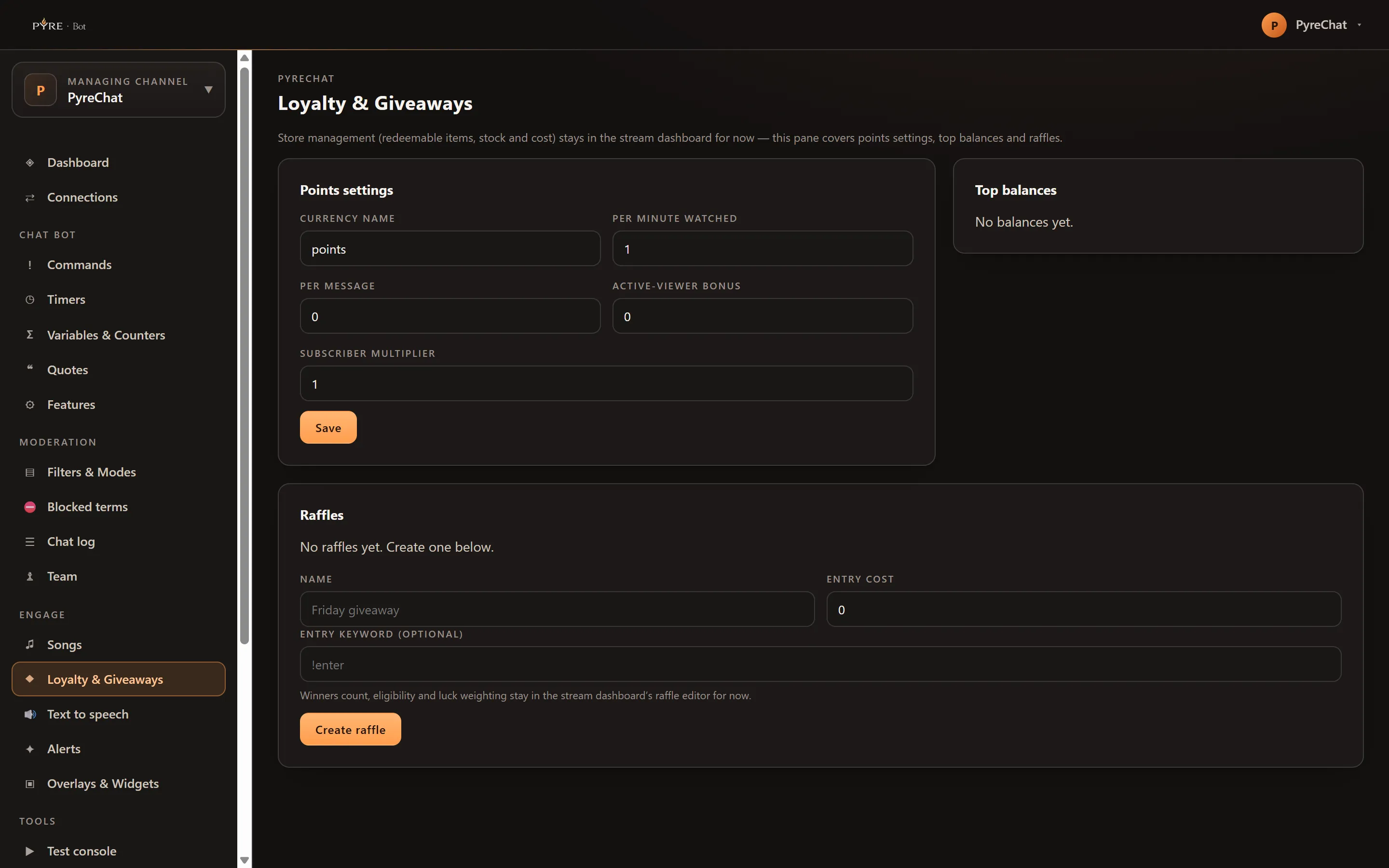
-
Open Loyalty & Giveaways in Pyre.Bot.
-
Set the Currency name. Up to 40 characters. This is the word in every reply, and as above it is not the word chat types.
-
Set Per minute watched. It starts at 1. Read it as “per minute present in chat”.
-
Set Per message. It starts at 0.
-
Set Active-viewer bonus. It starts at 0 and is added to Per message on every message.
-
Set the Subscriber multiplier. A whole number, minimum 1, and 1 means no bonus.
-
Save.
Every field takes plain digits. Anything that is not digits is ignored rather
than saved as a surprise, so 1e3 and 5s do not become rates.
Top balances beside the form lists your top ten. A viewer whose display name the bot has never cached shows as their platform id instead of a name, which is a viewer it has not heard from recently rather than a broken row.
Raffles
Section titled “Raffles”A raffle is a giveaway chat enters with a word.
-
Give it a Name. This is yours, for the table.
-
Set the Entry cost, in points. 0 makes it free to enter.
-
Set an Entry keyword if you want one, for example
!enter. This is what chat actually types. -
Select Create raffle. It opens immediately, and the table lists it as
open. -
Select Draw when you are ready. Confirm, and the raffle closes with its winner shown in the row.
Entering is stricter than it looks. The whole message has to be the keyword and nothing else. Capitalisation does not matter, but “!enter me please” does not enter, and a raffle saved with no keyword at all cannot be entered from chat.
Entry is also silent. The bot does not confirm it, does not say the entry cost was taken, and does not complain when somebody enters twice. Say the rules out loud yourself, because the bot will not.
The entry cost comes out of the balance when they enter, and it does not come back. Losing a raffle refunds nothing, and neither does closing one.
Drawing cannot be undone from the portal. The confirmation says so, and the
raffle is retired the moment it resolves. From chat, !raffle reroll will draw
again while excluding whoever already won, which is the escape hatch when the
winner has gone offline. Reroll exists only in chat, and !raffle draw always
targets your newest open raffle rather than one you name.
Three things the create form does not offer: winners count, eligibility and luck weighting. The hint under the form points at the Pyre.Stream dashboard for them, and that hint is wrong today. The dashboard’s Raffles tab offers the same four controls this form does, a Name, an Entry keyword, an Entry cost and the button that opens the raffle, and no editor for the other three.
Two of the three are reachable, from chat. !raffle start takes -winners=3 for
a multi winner draw and -floor=subscriber for an entry floor, so chat is the
only route to either one, not merely the shorter one. Luck weighting has no
front door at all. The draw understands a per level weight and it currently
sits at 1 for everybody, so subscribers and VIPs have exactly the same odds as
anybody else, which is worth saying out loud before you run one.
If a draw is refused it says which of three things happened: the raffle no longer exists, it is already closed, or nobody has entered yet.
The store
Section titled “The store”!items and !redeem work against a store this page does not manage. The pane
says as much at the top: redeemable items, stock and cost stay in the
Pyre.Stream dashboard for now. Set your items up there, and chat spends against
them from any platform.
!openstore and !closestore are the moderator switch for whether redemptions
are being taken at all, which is what you want during a segment where you cannot
action them.
Your public leaderboard
Section titled “Your public leaderboard”Pyre can publish your board at pyre.studio/s/your-handle/leaderboard, listing up
to 25 viewers by current balance or by points earned all time.
It is off until you turn it on, and the switch is not on this page. It is Supporter leaderboard under What your page shows on the Public profile page, wearing the warning it deserves: the page names your viewers to anyone with the link. A viewer with no cached display name is published as “Anonymous” rather than as their platform id, so nobody is ever identified by an id they did not choose to show.
While the switch is off the address answers exactly as it would for a channel that does not exist, so nobody can tell the difference between a board you turned off and a handle nobody owns.
If points are not moving
Section titled “If points are not moving”Nobody is earning anything. Check the two rates separately. Per minute watched at 0 stops watch time. Per message and Active-viewer bonus both at 0 stop message earning. They are independent, and a channel can easily have one working and the other off.
One viewer says their balance reset. Ask which platform they are on. Two platforms means two balances.
A quiet regular has nothing. Expected. Read the watch time caution above.
!points stopped answering. Look for an enabled custom command named
points. A custom command with the same name takes over.
!points somebody says it cannot find them. Names are looked up from viewers
the bot has already credited on that platform, so somebody who has never
earned anything is genuinely unknown to it. A viewer who has been quiet on Twitch
is not findable by their YouTube name either.
The top balances table shows numbers, not names. Those are platform ids standing in for viewers whose display names have not been cached. They fill in as those viewers talk.
A moderator cannot find any of this. They will not. The whole section is
absent on a channel they moderate, by design. !raffle and the store switches
are their entire surface, and they work from chat.