
Variables
A variable is a placeholder you write into a command response. When the command runs, the bot swaps it for a real value: the name of the viewer who typed it, your current category, a random number, a counter, a stored value of your own.
Commands covers writing a command and picking a variable from the chips under the response box. This page is the reference behind those chips: every variable the bot understands, and what each one actually returns.
How a variable is written
Section titled “How a variable is written”There are two shapes, and both start with $:
- A bare name, like
$user,$argsor$1. Only six variables have this form. - A group in parentheses, like
$(uptime)or$(random 1 6). Everything after the first word inside the parentheses is that variable’s argument.
The five bare names that carry no argument also have a parenthesised twin, so
$(user) and $user are the same thing. Use whichever reads better to you.
Three rules govern how a response is expanded, and all three matter:
Expansion happens once, left to right. Whatever a variable returns is dropped
into the response as plain text and is never looked at again. A viewer who types
$(urlfetch ...) as an argument to your command has typed a piece of text, not a
variable: it lands in the response literally and nothing is fetched.
Anything the bot does not recognise is left alone. $5.99 survives as $5.99,
and $(nonsense) posts as $(nonsense). Prices, handles and stray dollar signs are
safe.
A variable the bot does recognise but cannot resolve becomes nothing at all. This is the one that bites, and it has its own note at the bottom of this page.
The people and the message
Section titled “The people and the message”| Variable | What it expands to | Example |
|---|---|---|
$user | The display name of the viewer who ran the command | Ada |
$args | Everything typed after the command name | !so Ada great stream gives Ada great stream |
$1, $2, and so on | The first, second, and so on word after the command. Past the end of what was typed, nothing | !so Ada great stream gives Ada for $1 |
$touser | The first word typed, and the viewer’s own name when they typed nothing | !hug from Ada gives Ada |
$query | $args, URL encoded, for dropping into a $(urlfetch) address | red panda becomes red%20panda |
$(userlevel) | The viewer’s level: everyone, subscriber, vip, moderator or broadcaster | moderator |
$(userlocation) | The location this viewer stored with !set location | Berlin |
$(userdata key) | Any other value this viewer stored with !set | $(userdata pronouns) gives she/her |
$(usertime) | The current time in the timezone this viewer stored, blank if they have not stored one | 21:04:33 |
Your channel and your stream
Section titled “Your channel and your stream”| Variable | What it expands to | Example |
|---|---|---|
$channel | The channel name | pyre |
$(provider) | The platform this message arrived on | twitch |
$(uptime) | How long the stream has been running, or the word offline | 2 hours 14 mins |
$(game) | The current category. Kept even off air, so it reads back your last one | Just Chatting |
$(title) | The current stream title | friday co-op runs |
$(followage) | How long the viewer has followed you, or not following. Add a name to ask about somebody else | 7 months 3 days |
$(commands) | The address of your public commands page | https://pyre.studio/s/yourname/commands |
$(social discord) | One configured link from your profile. The kinds are discord, youtube, x, instagram, tiktok, kick, facebook and website | https://discord.gg/example |
$(socials) | Every configured link at once, as Label: address, up to six of them | Discord: https://discord.gg/example · X: https://x.com/example |
$(uptime), $(game), $(title) and $(followage) are read live from the
platform using your own connection, so they need no third party service and no
setup beyond having the platform connected.
Two limits are worth knowing before you build a command on them. $(followage)
answers on Twitch only: neither Kick nor YouTube exposes a per follower follow date
an app can read, so it comes back empty there rather than guessing. And $(game) is
always empty on YouTube, which publishes no category for a live broadcast.
Randomness and counters
Section titled “Randomness and counters”| Variable | What it expands to | Example |
|---|---|---|
$(random 1 6) | A whole number between the two bounds, both included | 4 |
$(random.pick yes|no|maybe) | One of the options, separated by | | maybe |
$(count) | A counter that climbs by one every time this command runs | 47 |
Give $(random) its bounds the wrong way round and they are swapped for you, so
$(random 6 1) behaves like $(random 1 6). Give it a single number and that is
the only answer it can ever return.
$(count) keeps a separate tally for every command that uses it. The tally appears
on the Variables & Counters page the first time the command fires, and you can
correct it or delete it there.
Values you store yourself
Section titled “Values you store yourself”| Variable | What it expands to | Example |
|---|---|---|
$(var name) | The stored value of a variable you created | $(var raidmsg) gives your raid message |
$(setvar name value) | Nothing. It stores the value and stays silent | $(setvar lastboss Radahn) posts nothing |
$(incrvar name) | Adds one to a numeric variable and shows the new total. Add a number to step by more, or a negative number to count down | $(incrvar deaths) gives 12 |
These read and write the same store the Variables card manages, so a value you set from chat shows up on the page and the other way round.
Loyalty and quotes
Section titled “Loyalty and quotes”| Variable | What it expands to | Example |
|---|---|---|
$(points) | The loyalty balance of the viewer who ran the command | 250 |
$(pointsname) | The name you gave your currency | embers |
$(quote) | A random quote. Give it a number for a specific one | $(quote 5) gives quote five |
$(points) always reports the balance of the person who typed the command. It
ignores anything you pass it, so $(points someoneelse) still answers for the
viewer.
Time and arithmetic
Section titled “Time and arithmetic”| Variable | What it expands to | Example |
|---|---|---|
$(time) | The time now. Give it a timezone, then optionally a format | $(time Europe/Berlin) gives 21:04:33 |
$(countdown target) | How long until a date, in words. Once the date is past it says 0 seconds | 4 days, 2 hours |
$(countup target) | How long since a date, in words | 1 year, 3 months |
$(math expression) | The result of a sum | $(math (2+2)*3) gives 12 |
$(time) takes an IANA timezone name such as Europe/Berlin or America/Chicago.
With no format it gives HH:mm:ss; with one it understands YYYY, MM, DD,
HH, mm and ss, so $(time Europe/Berlin YYYY-MM-DD) gives 2026-08-20. A
timezone it does not recognise gives nothing rather than the wrong time.
$(countdown) and $(countup) take either a full date such as
2026-12-24T18:00:00Z or a plain epoch number.
$(math) is arithmetic and only arithmetic: numbers, + - * / % and parentheses.
Anything else in the expression, a letter or a semicolon or a function call, makes
the whole thing return nothing. That is deliberate, and it is why $(math) is safe
to expose to chat through $1.
Text, other commands and the web
Section titled “Text, other commands and the web”| Variable | What it expands to | Example |
|---|---|---|
$(urlencode text) | The text, URL encoded | red%20panda |
$(urldecode text) | The reverse. Malformed input gives nothing | red panda |
$(references !other) | The raw response of another of your commands, inserted once | pulls in your !discord response |
$(urlfetch address) | The body of an https request | whatever the address returns |
$(eval expression) | The result of a small JavaScript expression, run in a locked down sandbox | $(eval 1+1) gives 2 |
$(urlfetch) works with any public https address. It cannot reach private,
loopback or cloud metadata addresses, which is what stops a command from being
pointed at Pyre’s own infrastructure. Bare variables inside the address are filled
in before the request goes out, so
$(urlfetch https://example.com/api?q=$query) works as written.
$(references) inserts another command’s response as it is written, not as it would
have been expanded, and the inserted text is never expanded either. A command that
references itself returns its own raw body once and cannot loop.
$(eval) receives your expression as source, but any viewer supplied variable in it
arrives as a quoted string, never as code. That keeps a viewer from injecting
JavaScript through an argument, and it means a number you meant to do maths on needs
Number($1) around it.
Actions a moderator can trigger
Section titled “Actions a moderator can trigger”| Variable | What it does |
|---|---|
$(settitle text) | Sets your stream title |
$(setgame name) | Sets your category, resolved by name on each platform |
These two change your channel rather than your message, so they carry their own
gate. The action fires only when the person who typed the command is a moderator or
above, whatever the command’s own Who can use it setting says. A viewer running
an everyone command that contains one of them gets nothing and changes nothing. A
blank value is ignored too, so a mistyped !title can never wipe your title.
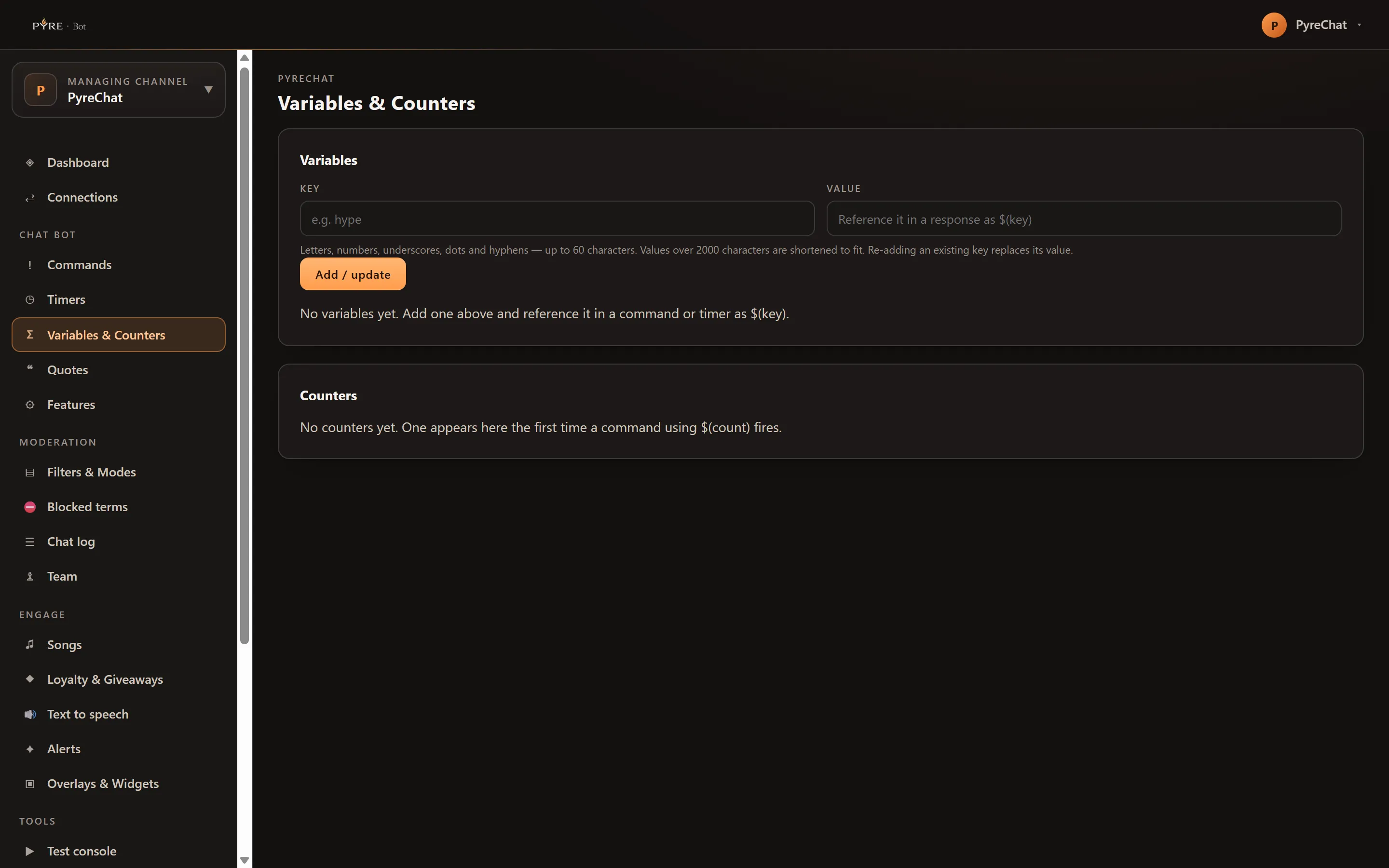
Managing stored variables and counters
Section titled “Managing stored variables and counters”Both live on Variables & Counters in the sidebar, one card each.
-
Pick the channel in the channel selector at the top of the portal if you are working on a channel you moderate rather than your own.
-
Open Variables & Counters.
-
Fill in Key and Value in the Variables card and press Add / update. Keys allow letters, numbers, underscores, dots and hyphens, up to 60 characters. Values are shortened to fit 2000 characters, and you can store up to 200 variables.
-
Re-add an existing key to change its value. There is no separate edit: adding a key that already exists replaces it.
-
Correct a counter in the Counters card by typing a new number and pressing Save, or remove one with Delete.
Counters are your own channel only. On a channel you moderate the card is still there, with a note in place of the table. Variables are available to a delegated Manager; an Editor or Read-only moderator sees the table but no add form and no delete buttons.