
Overlays and widgets
A widget is a piece of your stream that Pyre draws for you: a goal bar filling up, a ticker of your latest supporters, your merged chat on screen. Overlays & Widgets, in the Engage group, is the library. Every widget is one browser source with its own address, and the page has two tabs: Widgets and Media.
This page is your own channel only. It is not in the sidebar on a channel you moderate, because none of it has a delegated route: the widget library, the media library and the on stream inventory are all scoped to the account that owns them.
Get a widget on stream
Section titled “Get a widget on stream”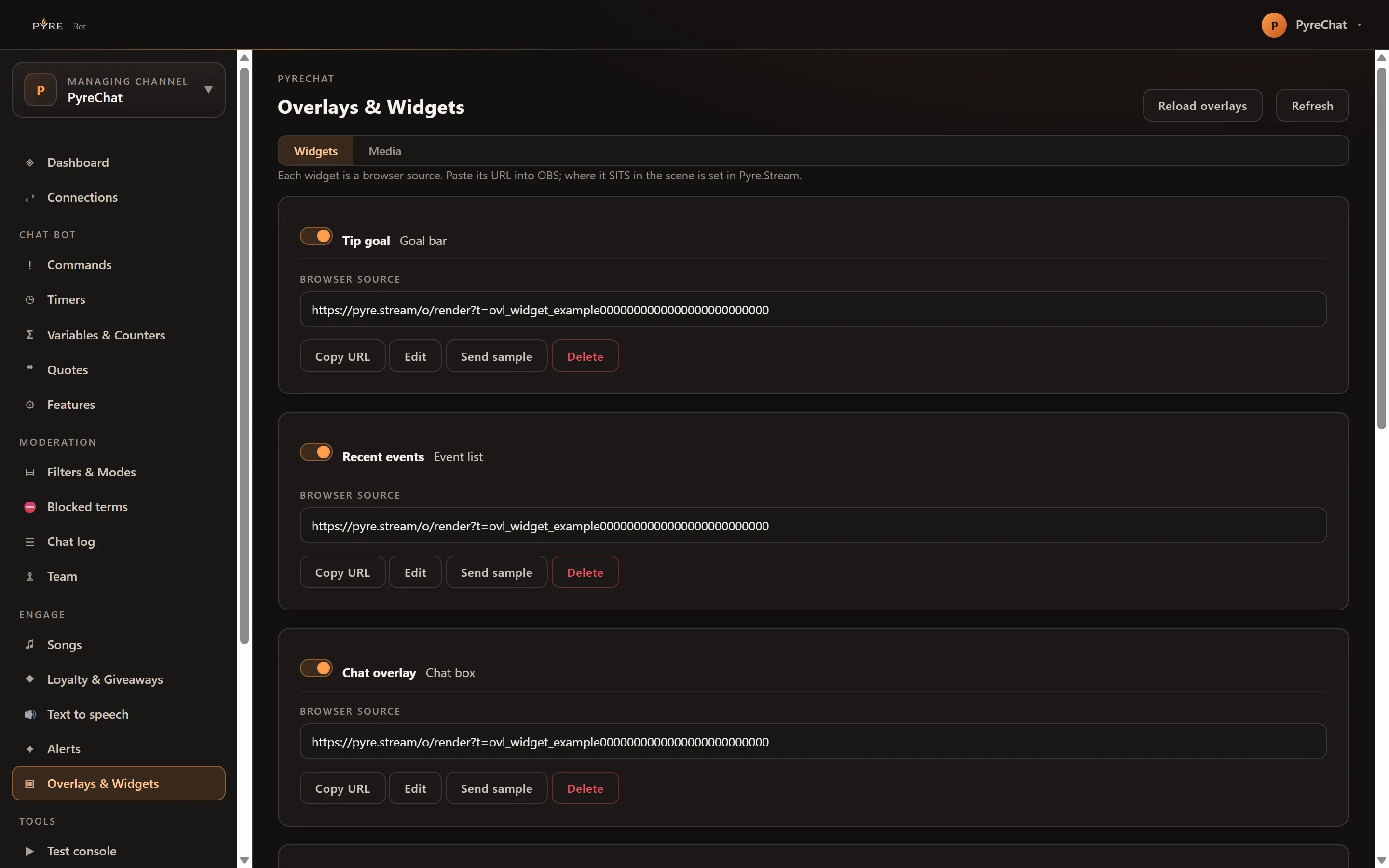
-
Open Overlays & Widgets. Use the channel selector at the top of the portal to confirm you are on your own channel.
-
Pick one from Add a widget. The gallery lists what you can create, one line each: Goal bar, Event ticker, Leaderboard, Event list, Chat box, Countdown, Media share, Emote wall, End credits, Viewer count, Stream labels, Spin wheel and Now playing. Press Add.
-
Copy its address. The new row carries a read only Browser source field and a Copy URL button.
-
Paste it into a browser source in your streaming software. Pyre names the source it creates for you
Pyre <Type> (<id>), for examplePyre Goal bar (7), so several widgets of one type never collide. The alert box and the TTS source are single sources and carry no number: they arePyre AlertsandPyre TTS. -
Send a sample to prove it works, on the types that can be sampled: chat box, emote wall, event ticker, event list, goal bar and now playing. Types without a sample button are configuration only, not broken. Samples are limited to one a second.
Four widgets already exist the first time you open the page: Tip goal, Recent events, Chat overlay and Event ticker. They are yours to rename, restyle or delete.
Each address is the credential for that one source. Treat it like a password, keep it out of screenshots, and copy it with the button rather than opening it as a link. Widget addresses are separate from each other and separate from your alert box and your TTS source, so one leaking does not expose the rest.
What you can change
Section titled “What you can change”Edit on a row opens the editor in a rail on the right.
Name is yours alone. It labels the source in your scene and nothing else, and renaming never moves the address, so an installed browser source keeps working.
The styling controls below it are the ones that widget actually accepts, so the rail is shorter on some types than others. A type that takes no overrides says so outright: “This source does not take appearance overrides, so it cannot be restyled here.”
- Font, from the curated list, and Size (
s,m,l,xl). - Position, on the widgets that sit in a box:
top,bottom,center,top-left,top-right,bottom-leftorbottom-right. - Text color, Accent and Background, each a colour picker.
- Background opacity, 0 to 100. It needs a background to act on: on its own it styles nothing and is dropped.
- Corner radius, 0 to 32.
- Font sizing,
autoorfixed, and Font size (px), 10 to 72. Withautothat number is a floor rather than the size. - A chat box adds Message background, Message opacity, Inner padding (0 to 48) and two declutter switches: Hide chat commands and Hide bot messages.
Leaving a control on Default keeps whatever the widget already had. Save changes writes the row.
The toggle at the top of a row is the widget’s own on switch. Turning it off stops Pyre pushing events to it, so it goes quiet where it stands. The address still resolves.
A goal bar carries a goal, and the editor grows a Goal section for it. Without one there is nothing for the bar to fill, and the rail says so: “No goal yet, the bar has nothing to fill.”
Add a goal, then set:
- Title, up to 60 characters.
- Target (cents), a whole number, at least 1.
- Counts:
follow,sub,bit,superchatortip. - Period:
all,monthorweek.
The row above the fields reads back where you are, for example “Tip goal, $12.00 of $50.00 (24%)”. Save goal writes it and Delete goal removes it, leaving the bar with nothing to fill again.
The media library
Section titled “The media library”The Media tab lists what you have: each file’s name, kind, size, and what is using it. It is read the first time you open the tab and not before.
Uploads do not happen here. They happen in Pyre.Stream, under Alerts & Overlays, then Media. This tab shows you what you have, tells you where it is used, and lets you delete what you no longer need.
“Not used anywhere” is a claim, and Pyre only makes it when it managed to check every place a file can be used. When it could not, the row says “could not check every place it might be used” and the tab repeats the caveat, because a surface that could not be read is not evidence of absence. Delete refuses on the same grounds, so the page never offers something the server will turn down.
Reload overlays
Section titled “Reload overlays”Reload overlays, in the page header, tells every overlay page you have open to reload itself: alert box, TTS source and every widget, in a desktop OBS and in a cloud studio alike. A browser source is a long lived page, so a settings save refreshes its configuration but only a real reload picks up new page code. Use it when a source looks stale rather than wrong.
Refresh next to it is the ordinary one: it re reads the library into the page.
What is set in Pyre.Stream instead
Section titled “What is set in Pyre.Stream instead”Where a source sits in your scene is OBS geometry, and it stays in Pyre.Stream. This page hands you the address and never moves anything in a scene. Uploads are the same story: this library reads and deletes, and Pyre.Stream owns the upload.
The alert box has a page of its own here: Alerts.
Troubleshooting
Section titled “Troubleshooting”The source is blank in OBS. Check the row’s toggle is on, then check the address in the browser source matches the one on the row. A widget you deleted takes its address with it, and any source still pointing at it goes blank: the delete confirmation says as much before you press it.
It looks stale rather than wrong. Press Reload overlays.
Save was refused. Colours have to be exact six digit hex values, which is why those controls are pickers rather than text boxes, and the numbers are bounded: opacity 0 to 100, radius 0 to 32, padding 0 to 48, font size 10 to 72.
Send sample says the widget has no browser source yet. That row has no address to send anything to. Delete it and add the widget again.
A file will not delete. Either it is still in use on your stream, or Pyre could not check everywhere it might be used. Both are refusals from the server, and the message tells you which one you hit.
A widget I have cannot be added again. Some types are retired. An existing row keeps its address and keeps painting, but the gallery will not create a new one, and the page says so instead of failing vaguely.