
Tips
A tip is a viewer sending you money from your public page. Pyre gives you the page, the form on it, the alert that fires when somebody uses it, and the goal bar it fills.
Your public profile is your tip page. There is no second address to share:
pyre.studio/s/your-handle carries your links, your live status and the tip form
in one document.
Before you start
Section titled “Before you start”Tips lives under Monetize in the sidebar and is yours alone. It never appears on a channel you moderate, and no access level reaches it, because money is one of the things that stays structurally with the channel owner. See Give a moderator access.
Tips are off until you turn them on. A creator who has never opened this page has a public profile with no tip form on it.
What a viewer sees
Section titled “What a viewer sees”The card is titled Send a tip, and this is the whole form:
- Choose an amount, your preset buttons. One is already selected when the page opens, so a viewer who agrees with your middle preset can pay in two clicks.
- Custom amount, for anything else. Typing here clears the preset.
- Where should it go?, a goal picker, but only if you have tip goals running. It always offers General support as the default, so nobody is forced to aim their money at a goal.
- Your name, up to 80 characters.
- Message (shown on stream), up to 200 characters, with a row of emoji to drop in.
- Make it monthly, only if you allow recurring tips.
- Payment method: Card or PayPal. The row is hidden when only one is available, because a choice of one is not a choice.
The submit button reads back the decision as it is made: Send a tip becomes Tip $5, and then Tip $5 toward whichever goal they picked.
There is no anonymous checkbox. Leaving Your name blank is how a viewer stays anonymous, and the placeholder says so by reading “Anonymous”. A blank name is stored as the word Anonymous, which is why your leaderboard can show one Anonymous row standing for several different people.
When the payment goes through, the viewer comes back to your page and gets a Thank you for the support! banner with your own thank-you message quoted underneath it. It shows once and then clears itself from the address bar.
Set it up
Section titled “Set it up”-
Open Tips in Pyre.Bot. The settings live in the Tip settings card.
-
Turn on Accept tips on your public page. This is the switch that puts the form on your profile. Nothing below it matters while this is off.
-
Decide on Allow monthly (recurring) tips. It starts on. Off, and the Make it monthly toggle never appears for viewers.
-
Pick your Currency. Six are offered: USD, EUR, GBP, CAD, AUD and DKK.
-
Set your Minimum tip. It starts at 1.00.
-
Set your Preset amounts, comma separated, up to 8 of them. They start at 2.00, 5.00 and 10.00. The hint under the field is doing real work: anything you type below your minimum is raised to the minimum rather than rejected, so a preset list can quietly come back different from what you entered.
-
Write your Thank-you message, up to 280 characters. This is what a viewer reads after paying.
-
Save. The two toggles are part of the form, so flipping one and navigating away changes nothing.
-
Connect a payout account. Money has to land somewhere. There are two cards for this, Payouts and PayPal, and they are covered below.
The settings pane deliberately has no bio and no socials fields. Those moved to Public profile, which is the other half of the same page.
Where the money lands
Section titled “Where the money lands”Two independent rails, one card each, directly under the settings. You can run either, both, or neither, and a viewer is offered whichever ones are ready.
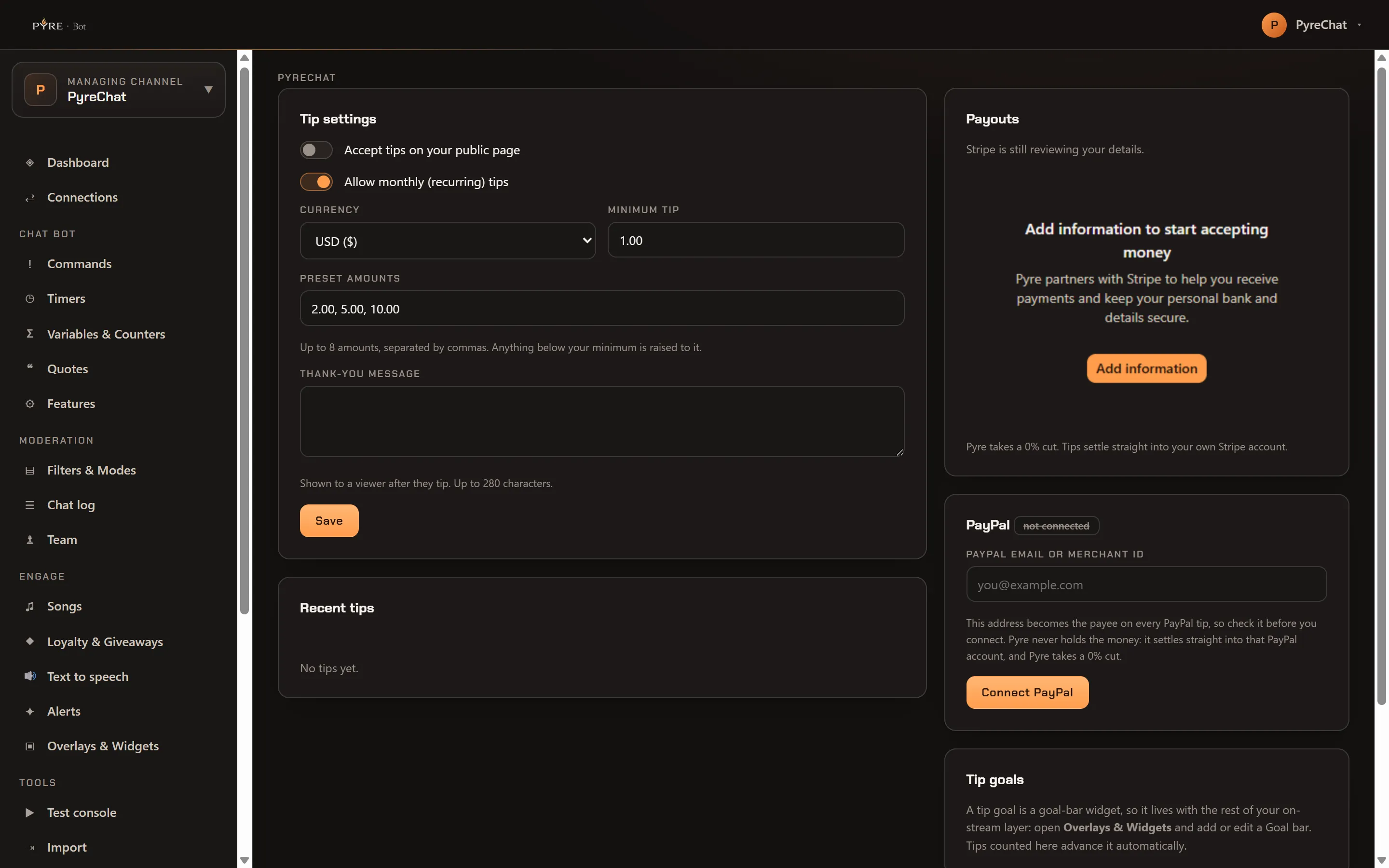
Pyre takes a 0% cut on both rails. A tip settles into your own account: Pyre never holds the money and there is no Pyre balance to withdraw from later, which is why each rail needs an account of yours attached before it can carry anything.
Payouts, for card payments
Section titled “Payouts, for card payments”This card is Stripe, and it is the card rail. It shows your account status and nothing else about the account, then embeds Stripe’s own onboarding so you finish the setup in place. Where a deployment cannot embed it, the same card gives you a Set up payouts button that opens Stripe in a new tab and brings you back.
The statuses you can see are no payout account yet, Stripe is still reviewing your details, Stripe needs more information before it can pay you out, and Ready to receive payouts. Only the last one means money can move. When Stripe wants something, its own banner appears in the card with an Add information button, and that button is Stripe’s flow rather than ours.
You can turn tips on before this is finished, deliberately. What you get in exchange is an honest warning rather than a blocked switch: the pane raises a banner saying a viewer cannot complete a payment yet.
PayPal, for PayPal payments
Section titled “PayPal, for PayPal payments”Type your PayPal email or Merchant ID, press Connect PayPal, and that is the whole setup. There is no review step and no onboarding round trip, so a connected account can take PayPal tips immediately.
Both cards are owner only, at the server and not just in the interface. A platform operator acting on your channel gets a refusal rather than your payout form, and so does a moderator at every access level. Nobody completes another person’s payout setup.
What happens when a tip lands
Section titled “What happens when a tip lands”Four things, and only one of them needs setting up first.
An alert fires. Out of the box, with no configuration at all: an alert you
have never touched is treated as on, with no minimum. The default template is
{name} just tipped {amount}!. Everything about it, the sound, the image, the
animation and the wording, is on the Alerts page under the Tip row.
It gets read aloud. Tips are one of the event types text to speech reads by default, and what it reads is the viewer’s message. Spoken text is cut at 300 characters and a viewer can only type 200, so a plain tip message is never cut off. Adding the tipper’s name to your read format is what can push one over.
Your goals advance. A tip goal is a goal bar widget, so it is not configured here. The Tip goals card on this page says as much and points at Overlays & Widgets. If a viewer picked a goal on the form, only that goal moves. If they did not, every matching goal does.
It is counted. Recent tips and Top supporters this month on this page both fill in without you doing anything.
If you want a tip to have to clear a floor before it interrupts your stream, set Minimum amount (cents) on the Tip row of the Alerts page. It starts at 0, meaning every tip fires.
What tips do not do
Section titled “What tips do not do”Honest limits, so you do not go looking for them:
- The bot does not post in chat when a tip lands. The alert is on your overlay, not in your chat. Nothing ships that announces a tip to chatters.
- There is no
!tipcommand. No built in command posts your tip page address, and there is no tip variable for a custom command. Your profile URL is the link, and you share it yourself. - A tip does not award loyalty points. A tipper is a payment, not a chat identity, so there is no viewer balance to credit. Points come from chat. See Loyalty and giveaways.
- You cannot create or edit a goal here. Only see that they exist and be told where they live.
- There is no tip blocklist. A viewer’s message is capped at 200 characters and that is the only filter on it, so the moderation to think about is what your alert and your text to speech do with the words.
Recent tips and top supporters
Section titled “Recent tips and top supporters”Both cards on this page show up to eight rows.
Top supporters this month means the calendar month, counted from the first instant of it. The board on your public page uses the same word for a rolling 30 days, so the two can disagree in the first days of a month. Neither is wrong, they answer slightly different questions, and the public one is the one your viewers see.
Your public page also carries its own leaderboard with ALL, MONTH and WEEK tabs, and it only shows the tabs when at least two of those boards have anybody in them.
If tips are not arriving
Section titled “If tips are not arriving”Your page has no tip form. Accept tips on your public page is off, or was never saved. A viewer sees a profile with no form and no explanation, so nothing on the page will tell you this. Check the toggle rather than the page.
Your page says it cannot accept tips yet. Tips are on but your payout account is not finished. The pane raises a banner saying the same thing. Finish the setup the Payouts card prompts you for.
A viewer says a small amount was refused. Each payment method has its own floor, and setting your minimum to 0 does not lower it. The form handles this itself: when an amount is too small for the card rail but PayPal can still carry it, the viewer is told and offered PayPal.
Your presets came back different. Anything below your minimum was raised to it on save. Lower the minimum first, then set the presets.
A tip landed but no alert fired. Check Minimum amount (cents) on the Tip row of the Alerts page, and check the alert is not explicitly switched off. An alert you have simply never opened still fires.
A renewal alert had a blank name. Expected, and covered above. Rewrite the
recurring tip alert so it does not use {name}.