
Song requests
Song requests let your chat put tracks in your queue. A viewer pastes a link, Pyre resolves it, checks it against your rules, and either adds it or says exactly why it could not. Nothing is ever refused with a bare “no”.
Requests are off until you turn them on. Your player, your backup playlist and the now playing card all work without them, so switching requests on is a decision about chat, not about music.
What chat types
Section titled “What chat types”| Command | What it does | Who |
|---|---|---|
!sr <link> | Request a track | Everyone, by default |
!srpriority <link> | Request a track that jumps the queue | Everyone, by default |
!song | What is playing, and who asked for it | Everyone |
!queue | The next three tracks, then a count | Everyone |
!wrongsong | Take back your own newest request | Everyone |
!voteskip | One vote toward skipping the current track | Everyone |
!skip, !next, !clear, !promote, !volume | Move the queue | Moderator and above |
!currentsong, !songlist, !skipsong and !clearqueue are aliases, so a
chat migrating from another bot keeps its muscle memory.
!sr on its own, with nothing after it, answers with how to use it rather than
failing. !song and !queue answer instantly from a snapshot the bot already
holds, so they cost nothing and never wait on a music service.
The verb has to touch the prefix: !sr link is a request, ! sr link is not.
That is one rule for the whole bot, not a quirk of this feature.
What Pyre accepts
Section titled “What Pyre accepts”YouTube and SoundCloud links, and a plain search when you have search configured. A viewer can wrap the link in angle brackets or quotes and it still resolves.
If you run Spotify as your music source instead, the queue takes Spotify links and searches only, and a YouTube link is turned away with a sentence that names the switch rather than pointing at a checkbox you never touched. Pyre can add to Spotify’s queue but Spotify’s API cannot remove from it, so a Spotify request that has been handed over can only be skipped once it starts playing.
Set it up
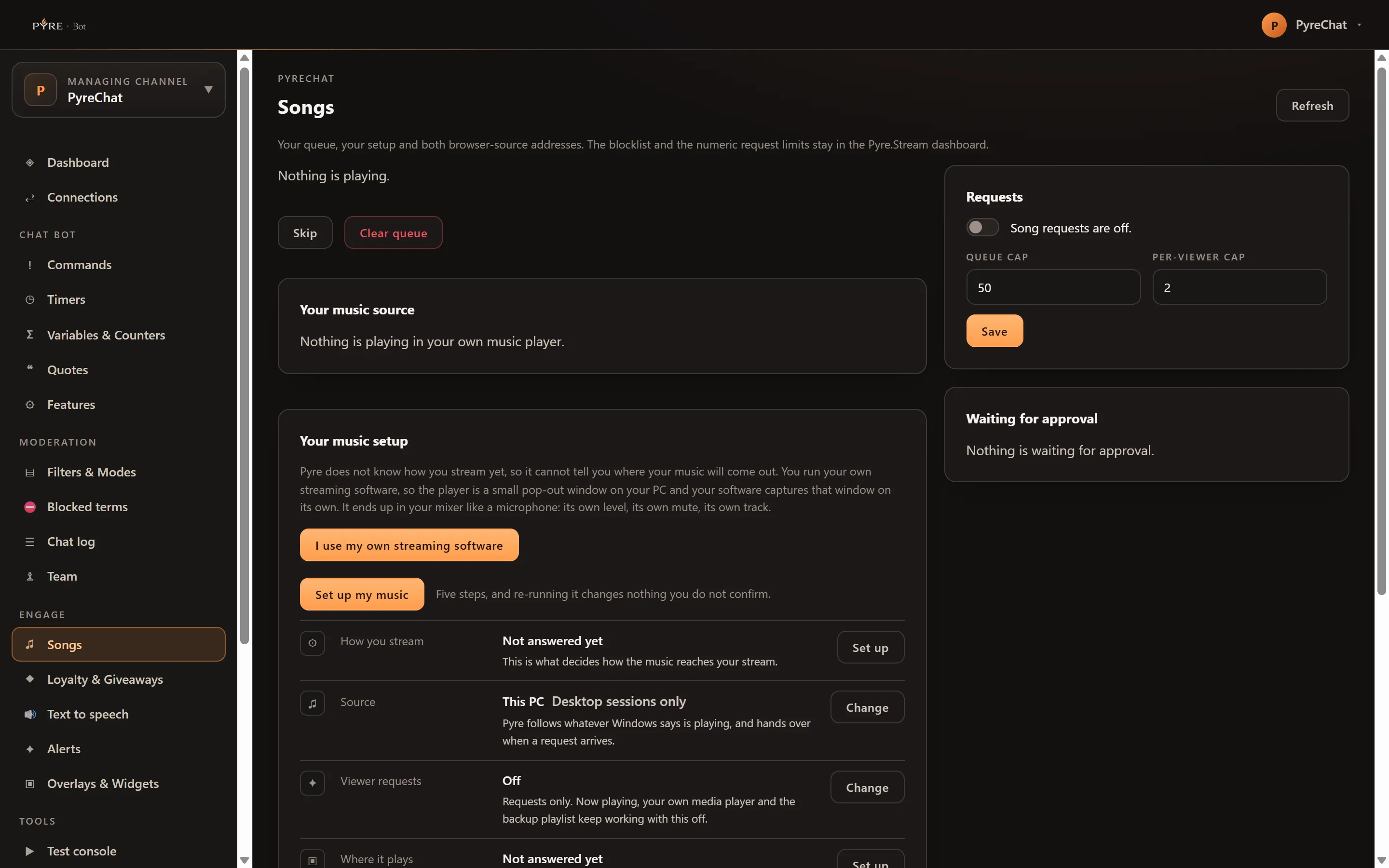
Section titled “Set it up”The Songs page in the portal carries your queue, your setup and both browser source addresses.
-
Open Songs in Pyre.Bot. Use the channel selector at the top of the portal if you want a channel you moderate rather than your own.
-
Turn on Song requests enabled in the Requests card. The line beside the toggle reads back what it is doing: “Viewers can request songs.”
-
Set the Queue cap, the number of active requests the whole queue holds. It starts at 50.
-
Set the Per-viewer cap, how many one person may have waiting at once. It starts at 2.
-
Save.
-
Run Set up my music in the Your music setup card if you have not already. Five steps, and re-running it changes nothing you do not confirm.
-
Copy your addresses from Your addresses. There are two: the player address, which you open before you go live and keep open for the whole stream, and the Pyre Now Playing card address, a browser source at 520 × 140 that you place anywhere.
Those two names are the whole vocabulary. Pyre Music Audio is the audio input your music arrives on, with its own level, its own mute and its own track. Pyre Now Playing card is the visual, and it makes no sound, so moving or hiding it never touches the music. There is deliberately no third name.
Both addresses share one token. Roll both addresses replaces it, and anyone holding the old one loses control of your queue, which is the point.
What is not on this page
Section titled “What is not on this page”The blocklist, the numeric track rules (maximum length, minimum views, allowed and blocked categories) and the points pricing live in the Pyre.Stream dashboard’s music settings. Adding the browser source to a scene for you also stays there, because it needs a Pyre studio this page cannot reach.
Approving before anything plays
Section titled “Approving before anything plays”Require approval holds every request in the Waiting for approval card
instead of putting it in the queue. Each row carries Approve and Reject.
An unapproved request is deliberately invisible to !queue: naming it would
promise a slot you have not granted.
Approval is off by default. On Spotify it is the safe setting, because a request that reaches Spotify’s queue cannot be taken back out.
What a request costs
Section titled “What a request costs”Requests are free out of the box. Once you set a points price, this is the order Pyre checks, and it matters because the price is checked last:
-
Are requests on?
-
Is the viewer at or above your minimum level? Everyone, by default.
-
Is there room in the queue? The queue cap.
-
Does this viewer have room? The per-viewer cap, 2 by default.
-
Is their cooldown up? 30 seconds between requests from one viewer, by default.
-
Can they afford it?
Anything that fails on steps 1 to 5 fails before a single point is touched.
Three things bend the price. A subscriber discount takes a percentage off,
rounded down. Free at or above waives the cost for a level and everything
over it, and waives only the cost: an exempt moderator still fits inside the
queue cap, their own cap and the cooldown. A priority price replaces the
normal price rather than adding to it, and leaving it at 0 means !srpriority
simply costs the normal price.
Channel point requests
Section titled “Channel point requests”A viewer who redeems a song request reward is not charged loyalty points on top. The reward is the price, Twitch already took it, and billing the same request in two currencies would be the bug. Every other rule still bites: the blocklist, your minimum level, the caps and the cooldown.
Moderators
Section titled “Moderators”A moderator you have given access to sees the queue, the now playing line, Skip and Clear queue, and the approval backlog with its buttons. They do not see your settings, your blocklist, your addresses or your music setup, and those surfaces are absent rather than greyed out, because there is no delegated route behind them. A moderator whose access level is read only sees the queue and is told so in one line.