
Import from another bot
Moving to Pyre does not mean retyping your command list. Import reads your existing bot’s setup, shows you exactly what it found, and creates only the entries you tick. Nothing you already have is touched.
Before you start
Section titled “Before you start”- Import works on your own channel. It is not one of the delegated surfaces, so it does not appear while the channel selector is set to a channel you moderate.
- Know which bot you are leaving. Streamlabs is two different products with two different variable syntaxes, and you have to say which one you used.
- Preview writes nothing. You can run it as many times as you like to see what a source holds before deciding anything.
Run an import
Section titled “Run an import”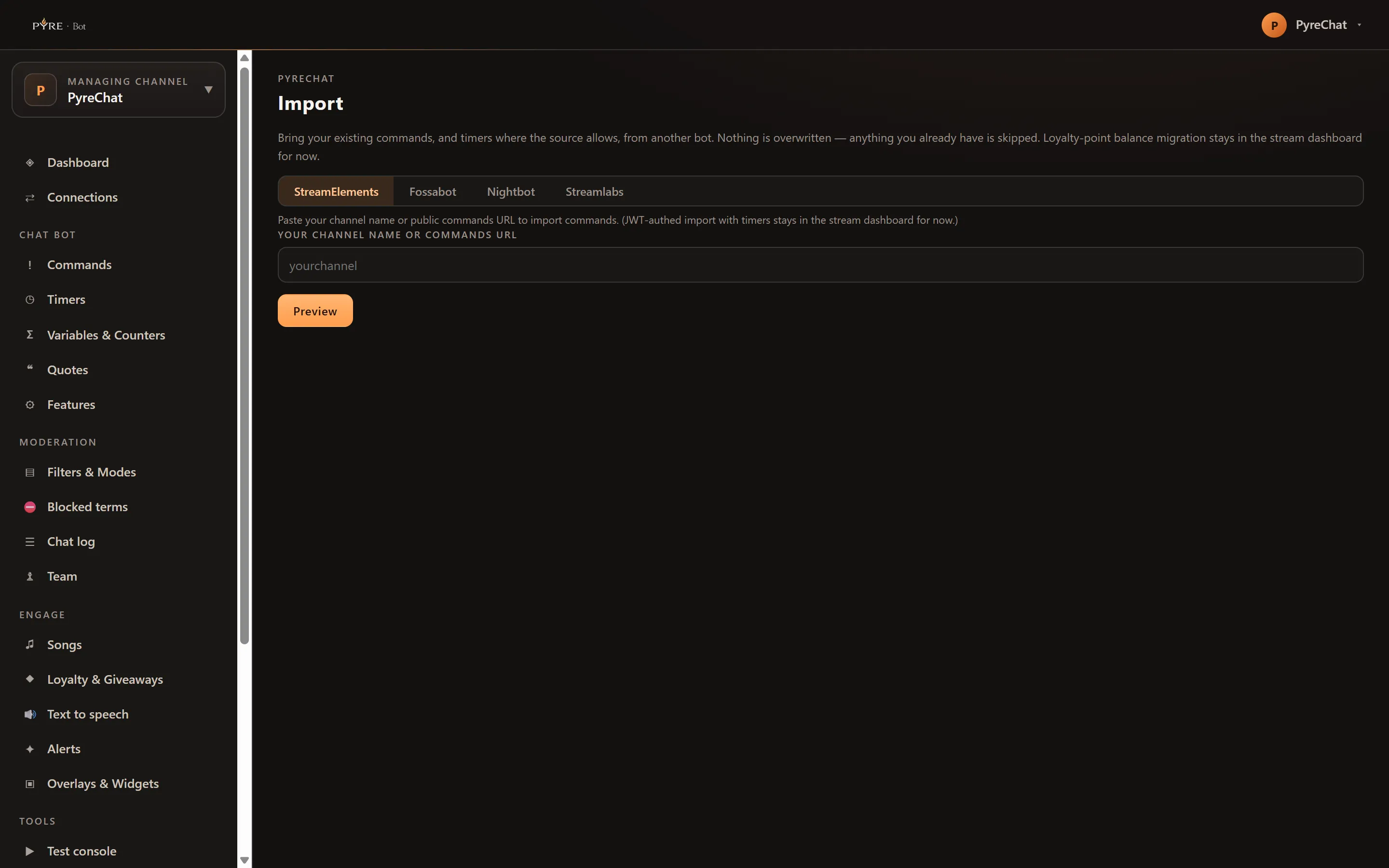
-
Open Import under Tools.
-
Pick your source from the tab strip: StreamElements, Fossabot, Nightbot or Streamlabs. The line under the tabs tells you what that source can give you.
-
Give it what it needs.
- StreamElements and Fossabot read a public list, so all they want is Your channel name or commands URL.
- Streamlabs has no import link at all. Choose Which Streamlabs bot?,
Cloudbot (cloud)orChatbot (desktop), then paste your export into Paste your exported commands (CSV or JSON). - Nightbot publishes nothing, so it needs a connection. Press Connect Nightbot, approve Pyre in the window that opens, and the preview runs by itself when that window closes.
-
Press Preview. You get a summary line, for example “Found 24 commands and 0 timers.”, followed by every entry found. Still nothing has been written.
-
Choose what to keep. Every row starts ticked. Untick anything you do not want, or use Select none and Select all to flip the lot. A row tagged
timeris a timer rather than a command. A row taggedreviewcontains something Pyre could not translate. -
Press Import selected. The result line reports what happened, for example “Imported 22 commands, 0 timers. 2 skipped”.
-
Press Import more if you want to run another source, or go to Commands and read through what arrived.
What each source actually gives you
Section titled “What each source actually gives you”The differences are not Pyre’s choices. They are what each bot exposes.
| Source | How you reach it | Commands | Timers | What travels with a command |
|---|---|---|---|---|
| StreamElements | Paste a channel name or commands URL | The public list | No | Aliases, global cooldown, per user cooldown, permission level, on or off |
| Fossabot | Paste a channel name or commands URL | Yes | No | Aliases, permission level, on or off |
| Nightbot | Connect your Nightbot account | Yes | Yes | Cooldown, permission level |
| Streamlabs | Paste a CSV or JSON export | Yes | No | Aliases, cooldown, permission, on or off, as far as your export has columns for them |
Two details worth knowing before you judge the result:
- Fossabot publishes no cooldown field, so every Fossabot command arrives with its cooldowns at 0. Set them yourself afterwards.
- Nightbot commands have no aliases, so nothing is lost when none appear.
What never comes across
Section titled “What never comes across”Import creates commands and timers. That is the whole of it. Loyalty point
balances, your regulars list, spam filters, chat modes, blocked terms and quotes
stay where they are, from every source. Nightbot’s regular permission has no
equivalent here and arrives as Everyone, so any command you had restricted to
regulars is open to your whole chat until you raise it.
Names, and what gets skipped
Section titled “Names, and what gets skipped”An import never overwrites. A command is skipped when its name already exists, and
also when any of its aliases does. The comparison ignores case and a leading !, so
!so and so are the same name. The rule applies inside one import too: if the
source has two commands that collide with each other, the first one wins and the
second is reported as skipped.
Timers are compared on name alone.
Skipped is not a failure. It means your existing version was left exactly as it was, and the count appears in the result line so you can go and compare the two by hand.
One import creates at most 200 commands and 50 timers. Beyond that the extras are dropped and the result line ends with “Some items were not imported because a limit was reached.” Run the import again after clearing space, or split the work.
Variables get rewritten
Section titled “Variables get rewritten”Every bot writes variables differently. ${user}, $(user), {user} and
$username all mean the same thing, and Pyre spells it $user. Import rewrites
what it recognizes, per source dialect, so the command works the moment it lands.
What it cannot translate, it leaves exactly as it found it and tags the row
review. The preview summary counts them: “3 tokens to review before use.”
Things that reliably need a look:
- A response that starts with a chat command such as
/timeout,/banor/me. A Pyre command response is a message, not an action, so it cannot perform one. - A Streamlabs named counter such as
{count deaths}. Pyre’s counter is per command, so the name is dropped and every such command shares one count. - A random range Pyre cannot read as two whole numbers.
- A Nightbot positional default such as
$(1=default). It becomes$1and the default is lost. - A Nightbot timer whose interval is not a plain number of minutes or a simple every N minutes schedule. It arrives with no interval set.
When it does not work
Section titled “When it does not work”“We could not read that channel. Check the name or the commands URL.” The source could not find that channel. StreamElements and Fossabot read the public commands page, so use the name that bot knows you by, not your Twitch display name if the two differ. A full commands URL works too.
“Connect Nightbot first, then Preview.” The connection did not complete. The window may have been blocked, or closed before you approved. Press Connect Nightbot again.
“Nightbot import is not set up yet. Ask an admin to finish connecting it.” This one is not on your side. It means the Nightbot connection is not configured on the server.
“Could not read that paste. Check the format and try again.” For CSV, the first
row has to be a header row with at least one column Pyre recognizes: a name column
(name, command or trigger), a response column (response, message, reply
or text), and optionally cooldown, permission, aliases and enabled. For
JSON, paste an array of command objects, or an object with a commands array in it.
“Nothing found to import.” The source answered, and had nothing. On StreamElements and Fossabot that usually means the commands list is not public, or the commands are hidden ones that the public list never shows.
Everything came back skipped. You already have commands with those names. That is the safety rule doing its job, not an error.