
Connections
Connections is the page that gets the bot into your chat. Every other page in the portal assumes it worked. There are three steps per platform, in a fixed order, and the card tells you which one you are standing on.
Before you start
Section titled “Before you start”- Connections is your own channel only. It is not one of the delegated surfaces, so it does not appear while the channel selector is set to a channel you moderate.
- Only the channel owner can connect a platform. The Connect button starts a sign in on that platform, and it signs in whoever is holding the browser. Someone acting on your behalf sees a note saying so instead of a button.
- This page is about chat, not broadcasting. Destinations, the studio and the relay live in Pyre.Stream. See Destinations.
Connect a platform
Section titled “Connect a platform”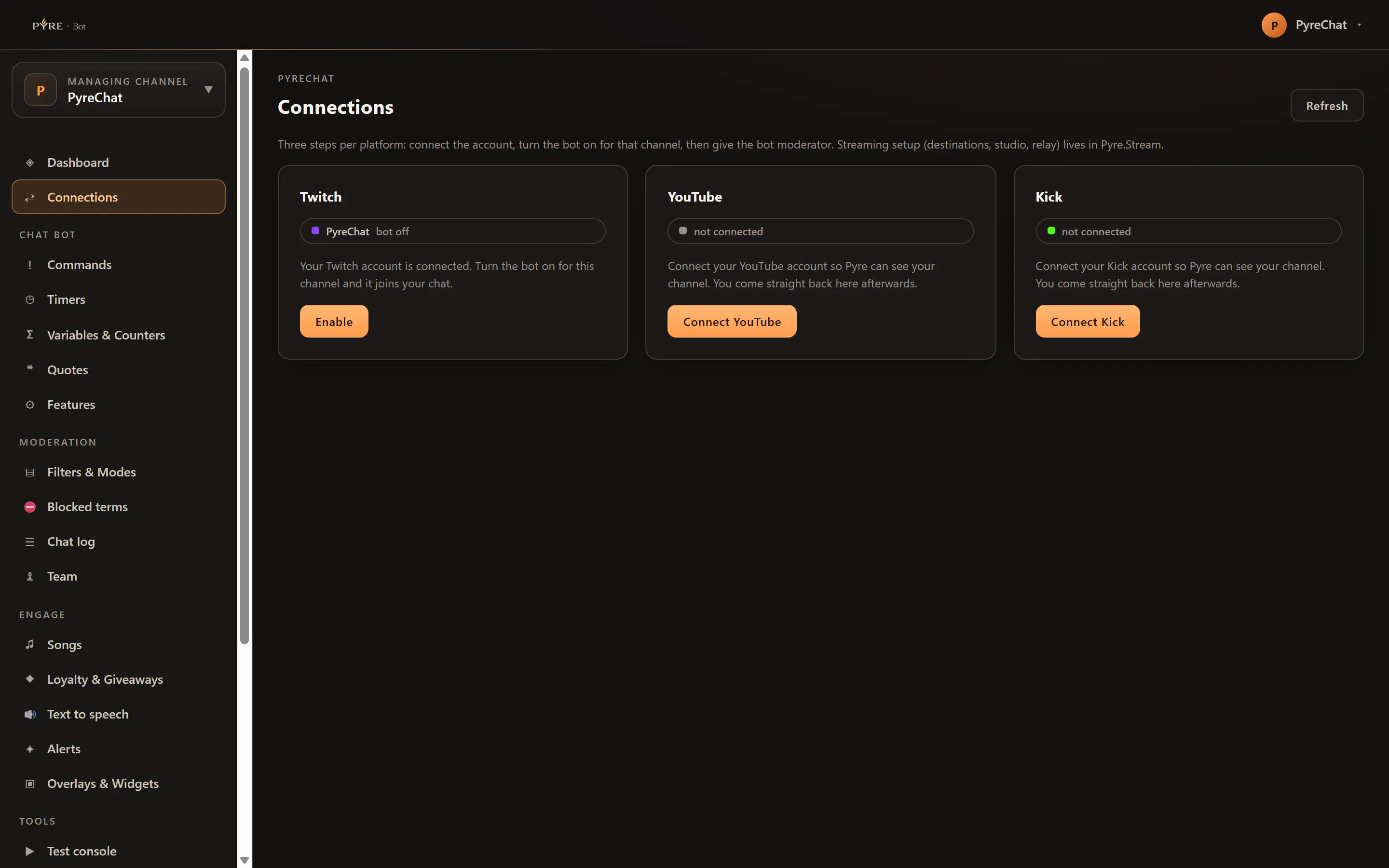
-
Open Connections. It sits above the sidebar groups, next to Dashboard.
-
Find the platform’s card. Twitch, YouTube and Kick each get a card, always, whether or not you have ever touched them. A platform you have not connected still has a card, because the one you most need to fix is the one that would otherwise be missing.
-
Press Connect Twitch, Connect YouTube or Connect Kick. You are sent to that platform to sign in, and you come straight back here.
-
Press Enable. This turns the bot on for that channel, and the bot joins your chat.
-
Give the bot moderator. On Twitch, Enable already tried to do this for you. On YouTube and Kick you have to do it yourself, in the platform. See the table below.
-
Press Refresh when you have changed something on the platform side. The page does not poll, because nothing on it changes unless you make it change.
What the card is telling you
Section titled “What the card is telling you”Each card carries a state and a line of explanation. The states run in order, and a card can only be on the rung above once the rung below is true.
| The card says | What it means | What to do |
|---|---|---|
not connected | Pyre cannot see your channel on that platform yet | Press Connect |
bot off | The account is linked, but the bot is not turned on for the channel | Press Enable |
no bot account connected | Pyre’s own shared bot account for that platform is not connected | Nothing. Your side is already correct and only the Pyre team can fix this one. The card deliberately offers no button |
joined | The bot is in your chat. Whether it holds moderator is not known yet | Press Check mod status |
joined · not modded | The last check said the bot does not hold moderator | Give it moderator, then press Check mod status again |
joined · modded | Done | Nothing |
waiting for a live broadcast | YouTube only, and not a fault | Nothing. Go live |
replies are paused until 00:00 UTC | The shared bot has spent its daily API allowance on that platform | Nothing. It resumes by itself |
That last one costs you less than it sounds like. Only posting is paused. The bot carries on reading chat, and timeouts, deletions and bans keep working throughout. In practice it is a YouTube state, because YouTube is the only platform whose chat API charges Pyre for each message the bot sends.
Two of those deserve emphasis, because both look like breakage and neither is.
no bot account connected means everything you can control is already right.
waiting for a live broadcast means a correctly configured YouTube channel that
simply is not live.
What each platform needs from you
Section titled “What each platform needs from you”| Platform | What connecting does | Getting the bot moderator | Worth knowing |
|---|---|---|---|
| Twitch | Signs you in to Twitch and links the account | Pyre can do it for you. Enable also asks Twitch to add the bot as a moderator on your channel | If the bot is a VIP in your channel, Twitch will not also make it a moderator. Remove the VIP, then Enable again |
| YouTube | Signs you in to Google and links the channel | You do it. Add the bot as a moderator in YouTube Studio | The bot only joins a YouTube chat while you are live, and it joins by itself when your next broadcast starts |
| Kick | Signs you in to Kick and links the channel | You do it. Type /mod followed by the bot’s name in your Kick chat | Kick has no moderator API at all, so nothing on this page can grant it |
Two things follow from how the bot finds your chat.
On YouTube the bot finds your broadcast the way a viewer would, through your
channel’s public live page. A public broadcast is found. An unlisted or private one
is not, and the card will sit on waiting for a live broadcast for the whole
stream.
On Kick, reading chat runs on your own connection, not on the bot’s. Kick delivers your chat to Pyre through a subscription created with the permissions your Kick connection carries. If that connection goes stale, Kick chat can go quiet while every other part of the card still looks healthy. Reconnect Kick if that happens.
The moderator step is not the same everywhere
Section titled “The moderator step is not the same everywhere”This is the part that costs people the most time, so it is worth being blunt about.
Twitch is the only platform where Pyre can grant moderator itself. Enable makes
the request on your behalf, using a permission your Twitch connection carries. If it
succeeds the card moves to joined · modded. If your Twitch connection predates
that permission the request is refused, so reconnect Twitch first and then press
Enable again.
On YouTube and Kick, Pyre can neither grant moderator nor read whether the bot
has it. Neither platform offers the API for it. So on those two the button still
runs, and it still reports joined · not modded afterwards, because a negative is
the only honest answer available. Grant moderator in the platform and the bot will
work, even though the card keeps saying it cannot tell.
Reconnecting
Section titled “Reconnecting”A platform connection is not permanent. When Pyre starts needing a permission your existing connection does not carry, a strip appears across the top of the portal saying so, with a Reconnect button in it. Pressing it runs the same sign in as the original connect and takes a few seconds.
You can dismiss that strip, but it comes back next time you open the portal, and it will keep coming back until you reconnect. That is deliberate: a stale connection does not fail loudly, it just quietly stops being able to do one particular thing.
A reconnection never removes anything. Your commands, timers, quotes and settings are attached to your Pyre account, not to the platform token.
When it does not work
Section titled “When it does not work”The Connect button is a note instead of a button. You are acting on someone else’s channel. Only the owner can connect a platform, because the sign in would otherwise link your account rather than theirs.
“Could not read your channels.” The page could not load your platform list. Press Try again. If it persists, sign out and back in.
The card says bot off after you pressed Enable. The enable did not take.
Press Refresh and read the state again before pressing anything else.
The bot is in chat but says nothing. Check the state first. If it reads joined · not modded on Twitch, moderator is the likely cause. If it reads replies are paused until 00:00 UTC, the bot is reading fine and just cannot post until the
allowance resets. If the card looks healthy, the feature itself may be off:
Features is the master switch list, and nothing there is on by accident.
YouTube says waiting for a live broadcast and you are live. A YouTube chat only
becomes reachable once the broadcast is actually running, not while it is scheduled
or in preview. Press Refresh a minute after going live. If it still says that,
check the broadcast is public: the bot cannot find an unlisted or private one.