
Your public page
pyre.studio/s/your-handle is the page you give people. It is one document with a
sticky tab rail across the top, not a set of separate pages that happen to share a
name, so a viewer who arrives on your commands list is already standing on your
channel home.
Public Profile, under CONTENT in the Pyre.Stream sidebar, is the one editor
for it. Its subtitle is the whole promise: Everything on your public page in one place.
Your bio and your socials used to be edited on the Tips page, your links in a
separate link in bio pane and your platform chips nowhere at all. Three editors
over one page could disagree with each other and with the bot. One cannot.
The editor
Section titled “The editor”The header carries three things: a Published toggle, a View page ↗ link so
you can check the result, and Save. Switching to Hidden does not delete
anything, and the page says exactly what it costs:
Your page is hidden: the banner, title, bio, socials and links are not shown. Your name, avatar and tip form still are.
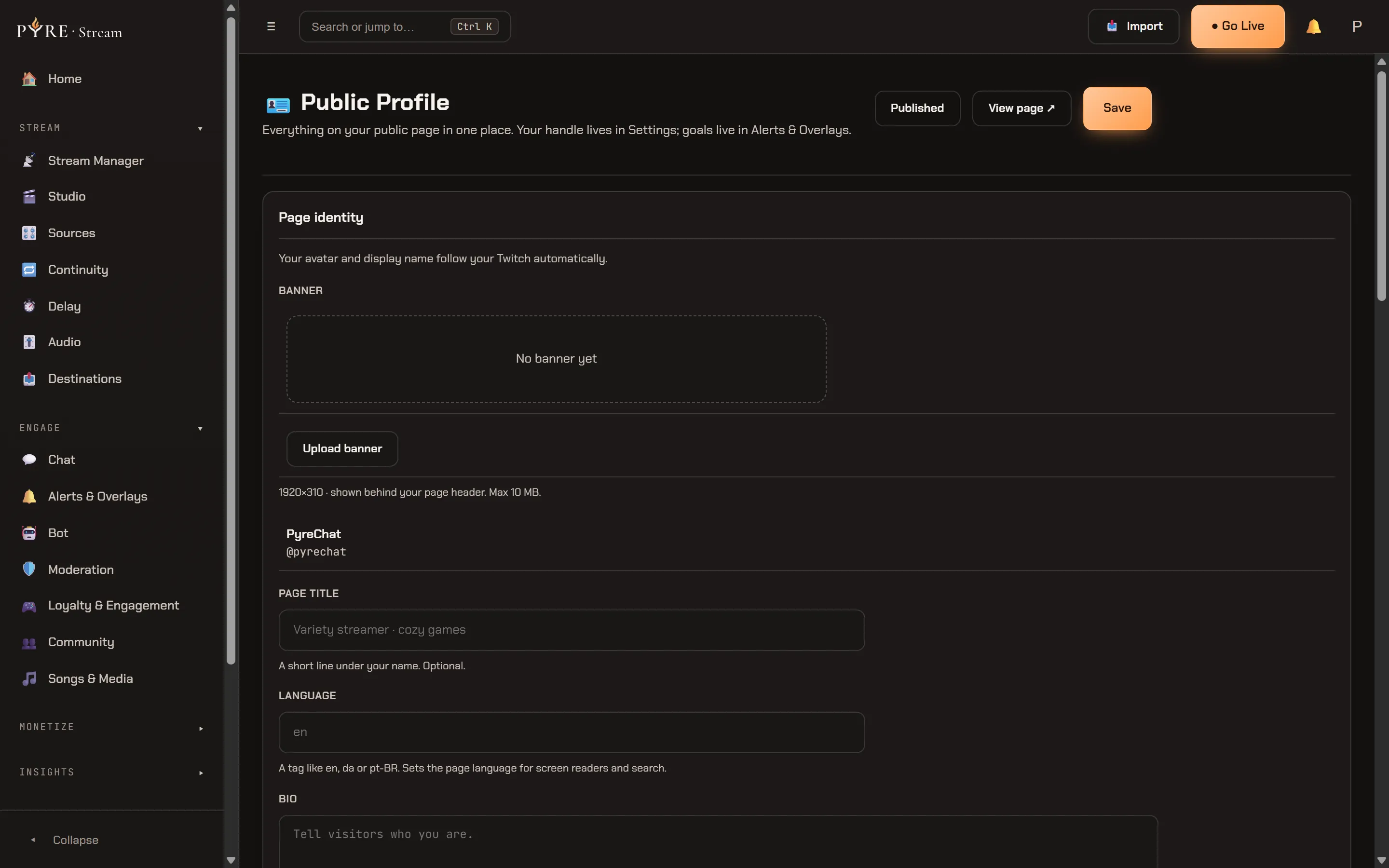
Page identity is your banner, page title, language and bio. The banner is an
upload, with a Upload banner button and a Remove beside it, and the
help line gives you the real numbers: 1920×310 · shown behind your page header. Max 10 MB.
It goes into your ordinary media library, the same one every other upload in Pyre
lands in, so there is no second bucket and no second size policy. Until you add
one the slot reads No banner yet. Your avatar and display name are not fields
here at all: they follow your Twitch. Page title is a short line under your
name, Language is a tag like en, da or pt-BR that sets the page language
for screen readers and search, and Bio runs to 500 characters.
Social media is eight named boxes in a fixed order: Discord, YouTube, X,
Instagram, TikTok, Kick, Facebook and Website. Paste whatever you have, a full
URL, a bare host or an @handle. Clearing a box removes that entry rather than
saving a blank, which is how you go back to the automatic chip for a platform.
Those chips sit above the boxes: Pyre derives them from the platforms you have
connected, they recompute as you type, and typing your own Kick or YouTube URL
takes the derived one away, because you have just claimed that slot yourself.
Under the eight is + Add custom social, which is how anything not on the list
gets on your page. A custom row is a name and a URL, up to ten of them, and the
help says what you trade for the freedom:
Custom socials take a name + URL and render with a generic link icon. Bot commands only exist for the named defaults.
Tipping presence holds one field, the thank you message a supporter sees right after they tip. It is the same setting the Tips page edits, through the same door, not a copy of it. Money settings stay on Tips.
Loyalty leaderboard publishes your points board at
/s/your-handle/leaderboard. It is off until you switch it on, and the card says
why: it lists your top viewers by name, to anyone, with no sign in.
Links is the ordered list on your page, up to 30. Each row is a label, a URL and a kind (Link, Social or Product). Rows carry ↑, ↓ and Remove, and that arrow pair is the ordering control: the list renders on your page in exactly the order you leave it in here. If you keep an old unpublished link in bio draft, the card offers to restore it rather than quietly dropping it.
Upcoming streams is a pointer, not an editor. Your schedule moved to Schedule and Social, and the card carries the link to it, because a schedule that replicates to Twitch and YouTube is one thing with one owner.
Live on your page is the two switches that decide whether the live band exists. Then press Save, which sends only the fields you actually changed.
The tab rail
Section titled “The tab rail”Across the top of the page, in this order:
Home, Commands, Song queue, Voices, Clips, Videos, Leaderboard, Schedule.
Most of them carry a count when Pyre knows one. All of them are hidden, never disabled: a creator who has enabled no TTS voice has no Voices tab, and a creator with no leaderboard has no Leaderboard tab. A greyed out tab is an invitation to click something that will not answer, and on these pages a page that does not answer is deliberately indistinguishable from a creator who does not exist.
Schedule is the odd one out: it is a pane on Home rather than a page of its own, because the schedule is already in Home’s payload and giving it a route would mean a second request for data the page is holding.
Home, from the top
Section titled “Home, from the top”-
The identity header. Banner, avatar, name,
@handle, bio and a Support button. It is the same header on every tab and it condenses as you scroll rather than swapping for a smaller version, so moving between tabs does not make the page reassemble itself. -
The live band. Your player, with the merged chat beside it. The player carries one tab per connected platform and starts muted, always. A LIVE badge appears only where Pyre actually knows: it reads Twitch’s liveness, so Kick and YouTube tabs say nothing rather than claiming you are offline. When Twitch says you are offline and there is nothing unknowable left, the band collapses to one row with an Open player button instead of a black rectangle, and the page leads with your goals instead.
The chat panel is your own channels, merged into one feed and read only: nobody can send a message from your page. Channels you merely monitor in Pyre.Chat are never included. Messages appear a few seconds late so your moderators’ deletions land first, and a deleted message is removed from the page.
-
The engagement strip, your current goal and a short ticker of recent support. Built from what the page already shows, so it publishes nothing new.
-
The cards row. Find me live on (the platforms you are connected to, with real links), Upcoming streams, Songs & Media (now playing and up next, only if you run song requests) and a Chat commands teaser (only if your channel really has public commands). Each one hides itself when it has nothing, and the first two are built from facts Pyre already holds, so a creator who has configured nothing still gets a page with something on it.
-
The tipping hub, your tip form with your goals under it, and your recent tips and top supporters beside it. If you have tipping switched off, the whole hub is absent and the page is your header, your socials and your tabs.
Upcoming streams, and Remind me
Section titled “Upcoming streams, and Remind me”Home shows the next two and the Schedule tab shows them all, from one payload, so
the two can never disagree about a date. Each row reads Today, Tomorrow or a
short date, and a weekly slot is marked as such.
Every time on that page is rendered in the viewer’s own timezone, not yours. Beside each row is Remind me, which downloads a calendar invite. The file is built on the server from the slot you actually saved, never from anything the page was holding, and it needs no account to use.
Clips and Videos
Section titled “Clips and Videos”These two tabs are not configured here. They are fed by the Public page card
on the Clips page, whose subtitle is
What your channel page at pyre.studio shows to viewers. and which holds three
switches: Show my Twitch clips, Show my Twitch VODs and
Show my YouTube videos. A platform you have not connected gets no switch, because
a control over a channel that does not exist teaches the wrong model. The note
under them is the bit worth remembering:
A tab disappears from your public page when nothing is left to show on it. See
Clips.
The tipping hub
Section titled “The tipping hub”The form, the presets, the goal picker, the monthly option and the thank you message are all documented once, in Tips. Nothing about them is different on Pyre.Stream. What this page owns is the two ends of it: the thank you message lives on Public Profile’s Tipping presence card, and everything about money itself lives on the Tips page.
There is no Chat tab
Section titled “There is no Chat tab”The merged chat is the panel beside the player and nowhere else. One live experience, not two destinations showing the same feed.
/s/your-handle/chat is still a real address, and it is deliberately framable:
it is the embeddable chat widget, meant for your own website or a browser source,
which is exactly what the panel on Home is framing. The Live on your page card
hands you the <iframe> snippet once the chat switch is on. It carries a powered
by Pyre footer and it can never send a message.
Your handle
Section titled “Your handle”Your handle is the page’s address, and it is edited in one place, Settings, on the Account tab. Public Profile links there rather than offering a second field, and changing it rewrites every address the handle builds. Until you pick one, the editor tells you so instead of showing you a URL that does not resolve.